LiteLLM is a versatile proxy, providing a multi-API compatible interface to multiple LLM providers. Requests that pass LiteLLM are logged and stored, which provides a wealth of information to understand and inspect LLM traffic.
This article provides a complete manual to manage budgets, rate limits, and costs. Learn about the nuances of budget allocation to individual users, teams, and organizations, service accounts, or agents. See how cost spending is tracked through either unmodified LiteLLM proxy usage or with custom headers to aggregate cost. Finally, get an overview of cost dashboards.
The technical context of this article is litellm v1.94.1, published on 2026-07-31. Setup and configuration examples should work with newer versions too.
The background material for this article stems from the official LiteLLM documentation, specifically the pages Virtual Keys, Budgets, Rate Limits, and Spend Tracking.
While I am fascinated by the capabilities of artificial intelligence tools and applications, crafting blog articles remains a personal skill. Every character, number, and symbol in this article was typed manually, with the exception of verbatim copies from log messages and screenshots.
Budgets in LiteLLM
Types
LiteLLM distinguishes different types of budgets. They are tied to a key and the key’s ownership. Reflecting the ownership types, these budgets emerge:
- Personal: Budgets allocated to a specific user account, which requires that the used key does not have a set
team_idparameter - Team: The budget available to a group of personal accounts
- Team member: A max amount or percentage a team member can use
Additional budgets can be configured for these:
- Service Account: A key with a team ID, but no attached member, is considered a service account, and it can have its own budget setting
- Agents: A flexible, session-based budget intended to keep costs for recurrent or scheduled invocation at bay
- Tags: Associate costs with tags that are passed with requests, and use these tags as flexible representations of use cases, products, or projects to accumulate costs in the internal database
- Global: Overall budget for the complete LiteLLM proxy usage
These conceptual budgets have two different technical realizations. The dominant type used in most official documentation texts are key budgets, created for a specific key. Another type is budget record, a separate entity created independently, and which can be linked to a key. The difference in declaration and tracking is covered in the following sections.
Key Budget Creation
Budgets for individual accounts or groups of accounts are created during initial key creation or an update operation on an existing key with budget information.
Here are the steps to create a team key budget.
- Create the team via the
/team/newendpoint, providing only a slimteam_aliaspayload
curl -X POST "http://0.0.0.0:4000/team/new" \
  --header "Authorization: Bearer $LITELLM_MASTER_KEY" \
  --header "Content-Type: application/json" \
  --data-raw '{
    "team_alias": "app-development"
  }'
{
  "team_alias": "app-development",
  "team_id": "aef0c9f8-fba2-412d-9f30-059ce8c97240",
  // ...
  "updated_at": "2026-08-08T12:05:25.430000Z",
  "created_at": "2026-08-08T12:05:25.430000Z"
}
- Create the key with
/key/generate, and in the request payload, associate it with the team and include a budget definition
- The budget definition consists of two parameters
max_budget: The total amount that can be spentbudget_duration: The timeframe in which the budget is valid; available values are numeric values with a suffix ofs(seconds),m(minutes),h(hours), andd(days)
- Optionally, multiple budgets can be defined
budget_limits: A list of the above budget attributes, allowing you to set multiple overlapping budget durations, e.g., a max daily and max weekly
curl -X POST "http://0.0.0.0:4000/key/generate" \
  --header "Authorization: Bearer $LITELLM_MASTER_KEY" \
  --header "Content-Type: application/json" \
  --data-raw '{
    "key_alias": "app-development-default-key",
    "team_id": "aef0c9f8-fba2-412d-9f30-059ce8c97240",
    "models": ["gpt-5.6-luna"],
    "max_budget": 100,
    "budget_duration": "7d"
  }'
{
  "key_alias": "app-development-default-key",
  // ...
  "spend": 0.0,
  "max_budget": 100.0,
  "team_id": "app-development",
  // ...
  "budget_id": null,
  "created_at": "2026-08-08T12:07:04.863000Z",
  "updated_at": "2026-08-08T12:07:04.863000Z"
}
Budget Record Creation
Budget records can be created via API and the GUI. The API way is chosen so that the results can be compared.
- The budget definition uses the same parameters of
max_budgetandbudget_duration
curl 'http://localhost:4000/budget/new' \
  --header "Authorization: Bearer $LITELLM_MASTER_KEY" \
  --header "Content-Type: application/json" \
  --data-raw '{
    "max_budget": 200,
    "budget_duration": "14d"
}'
{
  "budget_id": "414b42b4-b2a2-4c37-8364-4d966c0c57e0",
  "max_budget": 200.0,
  "budget_duration": "14d",
  "budget_reset_at": "2026-08-22T00:00:00Z",
  "allowed_models": [],
  "created_at": "2026-08-08T11:38:16.869000Z",
  "created_by": "default_user_id",
  "updated_at": "2026-08-08T11:38:16.869000Z",
  "updated_by": "default_user_id",
  // ...
  "organization": null,
  "projects": null,
  "keys": null,
  "end_users": null,
  "tags": null,
  "team_membership": null,
  "organization_membership": null
}
Interestingly, a record budget cannot be associated with a team. Running a /team/update request …
curl -X POST "http://localhost:4000/team/update" \
  --header "Authorization: Bearer $LITELLM_MASTER_KEY" \
  --header "Content-Type: application/json" \
  --data-raw '{
    "team_id": "aef0c9f8-fba2-412d-9f30-059ce8c97240",
    "budget_id": "414b42b4-b2a2-4c37-8364-4d966c0c57e0"
  }'
… silently accepts the passed budget_id parameter (which is, frankly, not part of its input schema anyway), and is also not shown in the response.
{
  "team_id": "aef0c9f8-fba2-412d-9f30-059ce8c97240",
  "data": {
    "team_id": "aef0c9f8-fba2-412d-9f30-059ce8c97240",
    // ..
    "updated_at": "2026-08-09T08:31:23.464000Z"
  }
}
Associating Budget Records with a Key
Interestingly, both concepts can be associated with the same key.
- Perform a
/key/updateoperation, and include the to-be-updatedkeyand thebudget_idin the request body
curl -X POST "http://0.0.0.0:4000/key/update" \
  --header "Authorization: Bearer $LITELLM_MASTER_KEY" \
  --header "Content-Type: application/json" \
  --data-raw '{
    "key":"sk-...dQSQ",
    "budget_id": "414b42b4-b2a2-4c37-8364-4d966c0c57e0"
  }'
The response shows that the team now has both a key budget and an associated budget record, visible from the budget_id attribute.
{
  "key_name": "sk-...dQSQ",
  "key_alias": "app-development-default-key",
  // ..
  "spend": 0.0,
  "expires": null,
  "models": [
    "gpt-5.6-luna"
  ],
  "max_budget": 100.0,
  "budget_duration": "7d",
  "budget_reset_at": "2026-08-10T00:00:00+00:00",
  // ..
  "budget_id": "414b42b4-b2a2-4c37-8364-4d966c0c57e0",
  "updated_at": "2026-08-09T08:15:03.053000+00:00"
}
Furthermore, the GUI just shows the key budget, not the record.

This mismatch is an unresolved, but closed bug, see the GitHub issue UI: budgets cannot be assigned to keys.
The catch: A budget record is meant as a reusable template. It is defined and associated with many keys. The actual spendings on a budget are stored as an association between the key and the template. If the template gets updated, the key keeps its spending, but the new lower floor or higher ceiling budget limit is applied.
Budget Introspection
Key budgets are reflected directly in any read operation of a key.
> curl 'http://localhost:4000/key/info?key=sk-...dQSQ' \
  --header "Authorization: Bearer $LITELLM_MASTER_KEY"
{
  "info": {
    "key_name": "sk-...dQSQ",
    "key_alias": "app-development-default-key",
    // ...
    "spend": 0.0,
    "expires": null,
    "models": [
      "gpt-5.6-luna"
    ],
    "team_id": "aef0c9f8-fba2-412d-9f30-059ce8c97240",
    "max_budget": 100.0,
    "budget_duration": "7d",
    "budget_reset_at": "2026-08-10T00:00:00+00:00"
    // ...
  }
}
Record budgets are returned from the /budget/list API endpoint.
> curl 'http://localhost:4000/budget/list' \
  --header "Authorization: Bearer $LITELLM_MASTER_KEY"
[
  {
    "budget_id": "414b42b4-b2a2-4c37-8364-4d966c0c57e0",
    "max_budget": 200.0,
    "budget_duration": "14d",
    //...
  }
]
Budget Behavior
Budgets are governed by the following rules:
- When a budget without duration is exhausted, all API calls are blocked
- When a duration-limited budget is exhausted, all API calls are blocked until the duration passes, or the budget is reset manually
- When a key budget is updated, the key’s spending tab is kept, and the new total budget value becomes effective
- When record budgets are updated, the associated key’s current spending is kept, and the new total budget value becomes effective
- When the budget duration passes, its spending tabs are reset
When budgets are exhausted, a fallback model can be used. Routing rules define a hierarchy of model calls, and models with an explicit input_cost_per_token: 0 and output_cost_per_token: 0 are considered free to use, so they can always serve requests.
Finally, in corporate and enterprise setups of LiteLLM in combination with a Redis server, hard budget enforcement should be applied. When the Redis service experiences service degradation, budget information might not be updated timely, violating spending limits. With the additional configuration file parameter fail_closed_budget_enforcement: true, spending tabs in the database are looked up before allowing a request.
Rate Limits in LiteLLM
Concepts
While budget limits protect against financial traps, rate limits prevent service degradations. Three rate limit types can be distinguished.
- Tokens per Minute: Defines an absolute limit of either input tokens, output tokens, or their sum
- Requests per Minute: The absolute number of requests that can be made, with any level of parallelism that the server can handle
- Max Requests: Keeps track of user sessions, and limits how many requests can be made
Rate Limits Configuration
In order to implement rate limits in LiteLLM, different declaration scopes, and slightly different variable names, can be set. In order of inheritance for the effective limit, they are:
- Tokens per Minute: Defined in the global configuration file as
tpm, in create/update operations on models astpm, in model deployment configurations, and in key definitions (for users or teams) astpm_limitfor the models section or a separatedmodel_tpm_limitkey-value array - Requests per Minute: The limits application can be set to input tokens only, output tokens only, or total, which means the sum of both, with the variable
token_rate_limit_type. The actual limit setting follows the same scopes as token limits: In the global configuration file and model create/update operations astpm, in keys asrpm_limitor list-style declarationsmodel_rpm_limit - Max Requests: Keeps track of user sessions, and limits how many requests can be made. A definite upper ceiling for all concurrently handled requests of a LiteLLM router instance can be set with
global_max_parallel_requests, or scoped to a user or team key withmax_parallel_requests
Limit Declaration Creation
Here is an example for setting key-specific limits.
curl -X POST "http://0.0.0.0:4000/key/update" \
  --header "Authorization: Bearer $LITELLM_MASTER_KEY" \
  --header "Content-Type: application/json" \
  --data-raw '{
    "key": "sk-GTHCqpPZFDPr544X3adQSQ",
    "rpm_limit": 10,
    "tpm_limit": 100000,
    "model_tpm_limit": {"gpt-5.6-sol": "20000"}
  }'
{
  "key": "sk-...dQSQ",
  // ...
  "metadata": {
    "model_tpm_limit": {
      "gpt-5.6-luna": "20000"
    }
  },
  "blocked": null,
  "tpm_limit": 100000,
  "rpm_limit": 10,
  // ..
  "updated_at": "2026-08-15T10:35:06.848000+00:00",
  "updated_by": "default_user_id",
  // ..
}
Alternatively, to ensure that global caps to specific models are permanent, the following block can be added to the LiteLLM configuration file.
model_list:
  - model_name: gpt-5.6-luna
    litellm_params:
      model: openai/gpt-5.6-luna
      api_key: os.environ/OPENAI_API_KEY
      rpm: 10
      tpm: 50000
      max_parallel_requests: 10
  - model_name: gpt-5.6-terra
    litellm_params:
      model: openai/gpt-5.6-terra
      api_key: os.environ/OPENAI_API_KEY
      rpm: 5
      tpm: 20000
      max_parallel_requests: 4
Limit Reflection
When using a model with configured token or request limits, the LiteLLM proxy response headers reflect availability. Application communication with LiteLLM can consume this information for dynamically adapting their requests, switching to similar quality models before the limits of a specifically used one become depleted.
An introspection of the response headers for a chat completion query …
curl -i -X POST "http://0.0.0.0:4000/v1/chat/completions" \
  --header "Authorization: Bearer ${LITELLM_OPENAI_KEY}" \
  --header "Content-Type: application/json" \
  --data-raw '{
    "model": "gpt-5.6-luna",
    "messages": [
      {
        "role": "user",
        "content": "Explain luna craters."
      }
    ]
  }'
… reveals full details about the key’s configured limits and remaining requests and tokens in the form of x-ratelimit-api_key-remaining-requests and x-ratelimit-api_key-remaining-tokens.
HTTP/1.1 200 OK
date: Sun, 16 Aug 2026 09:47:05 GMT
//...
x-litellm-call-id: e55758e8-3b3f-4115-81ef-552c80a53591
x-litellm-model-id: c09419a3bb470e3f63e84e79b1584a05a732fba5933fb0f9e1b5c75c8dac953d
x-litellm-model-name: openai/gpt-5.6-luna
x-litellm-model-api-base: https://api.openai.com
x-litellm-version: 1.94.1
//...
x-litellm-key-tpm-limit: 100000
x-litellm-key-rpm-limit: 10
x-litellm-key-max-budget: 100.0
x-litellm-key-spend: 0.0010004
x-litellm-response-duration-ms: 3939.586
x-litellm-overhead-duration-ms: 2.823
x-litellm-callback-duration-ms: 0.0
x-ratelimit-limit-requests: 500
x-ratelimit-remaining-requests: 499
x-ratelimit-limit-tokens: 200000
x-ratelimit-remaining-tokens: 199992
x-litellm-model-group: gpt-5.6-luna
x-litellm-attempted-retries: 0
x-litellm-attempted-fallbacks: 0
x-ratelimit-api_key-remaining-requests: 9
x-ratelimit-api_key-limit-requests: 10
x-ratelimit-api_key-remaining-tokens: 98971
x-ratelimit-api_key-limit-tokens: 100000
x-ratelimit-model_per_key-remaining-tokens: 18971
x-ratelimit-model_per_key-limit-tokens: 20000
Cost Management
When cost information is configured for models, and when the used user or team keys received budget and rate limit configuration, the structure for long-term data retention is set. While rate limits, due to their nature, are applied and reset dynamically, costs accumulate steadily and are stored permanently.
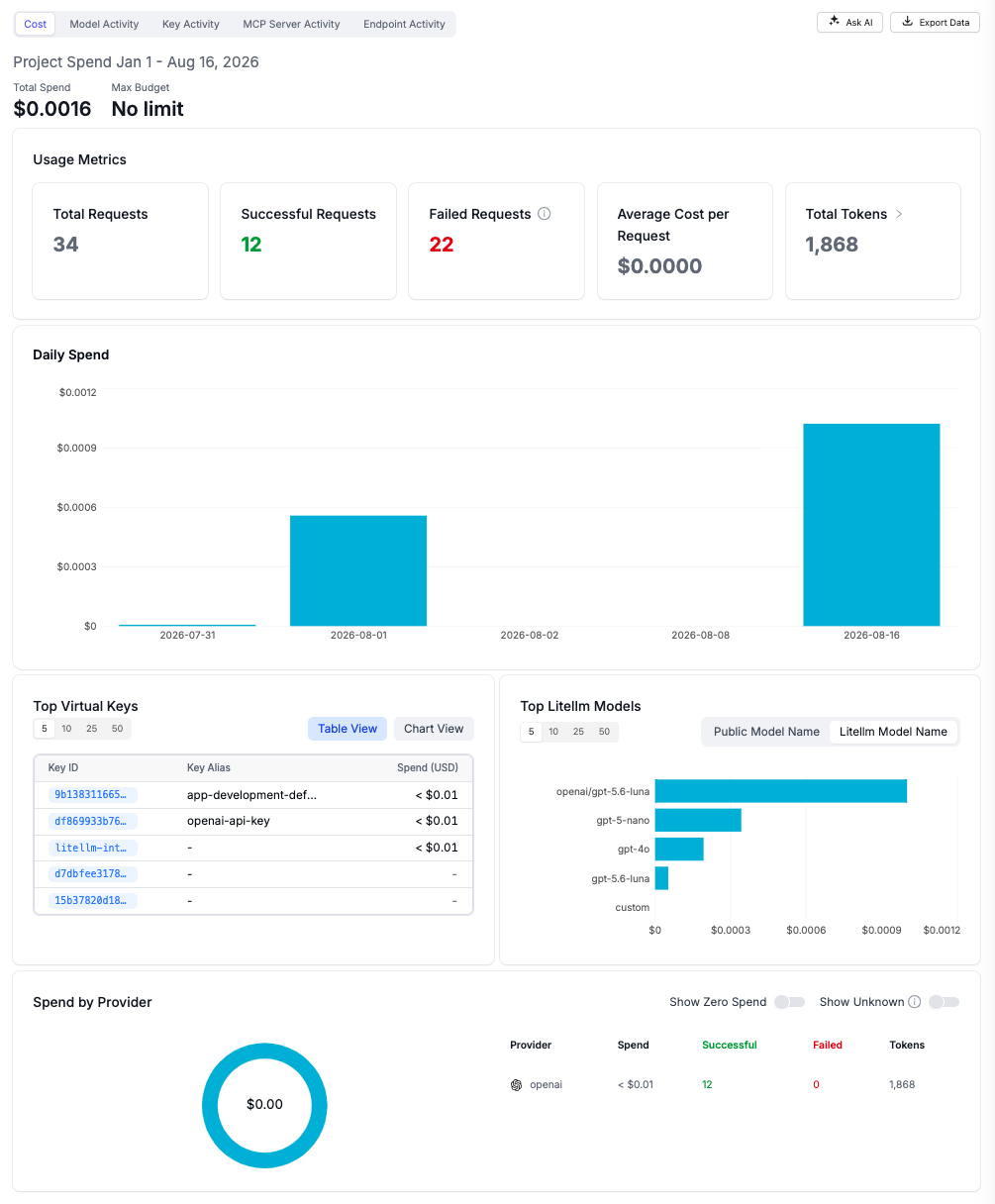
In the above sections, API usage for configuration was shown. API usage also actively returns, in the form of HTTP headers, the dynamic information about cost spending and effective rate limits. While this information can be used in this form by applications or systems interacting with LiteLLM, human operators can benefit from visual representation, gaining better insights. And for this goal, LiteLLM provides several dashboards.
Cost Management Information
LiteLLM maintains a public database, in the form of a JSON file, at their official GitHub repository at litellm/model_prices_and_context_window.json. This database is loaded once the LiteLLM process starts, and from thereon, kept in memory only. Should the server process run continuously for a very long time, price drift might occur: Providers update the price list, the database file on GitHub is updated, but LiteLLM’s in-memory representation remains at the old version. To update this information too, it is required to trigger an API call, or access the cost management dashboard that provides a button that triggers this API call.
Even when reloading the price information regularly, e.g., with a scheduled CronJob, LiteLLM reported costs might differ from the provider bills. In this case, there is a compact guide about Debugging a cost discrepancy available.
Cost Management Reporting
To access the cost information dashboard, apply these steps:
- Open the LiteLLM Dashboard at http://localhost:4000/ui
- In the menu shown on the left side, section
Observability, click onUsage - Select the
Usagescope for the cost overview in the dropdown menu, available options areGlobal,Your Usage,Organization(requires an enterprise license),Team,User, as well asCustomer,Tag, andAgent Usage, andUser-Agent(accumulates costs per user agent that interacted with the LiteLLM instance) - Adjust the timeframe
With my very limited, personal usage only, the dashboard reports these costs:
Conclusion
The era of flat-rate subscription plans is over. LLM model usage costs are rising. Effective budgeting, rate limiting, and cost analysis are crucial to keep operations afloat and prevent bankruptcy-level bills. This article showed how to manage budgets in LiteLLM, tied to individuals, teams, service accounts, or even agents. It detailed budget definition via API and GUI, and explored the logic of budget spending and cost accumulation. Similarly, the configuration options and scope for token and request limits were explored, with which aggressive overspending can be prevented, and general service availability maintained. The final section about cost management explained the underlying database and provided the steps to generate a cost overview via the GUI.