LiteLLM is a versatile LLM proxy server. It provides developers with a single service that accepts OpenAI and Anthropic API requests and forwards them to the configured models. It supports rolling budgets and cost tracking to prevent unrestricted token consumption. It also provides observability into external LLM usage.
Following the deployment options and local setup described in the previous article, this article focuses on model and key management. It provides a concise overview of the API routes and organizes the available request parameters into logical groups. Specifically, it covers model definitions, health checks, and key configuration.
The technical context of this article is litellm v1.94.1, published on 2026-07-31. Setup and configuration examples should work with newer versions too.
The background material for this article stems from the official LiteLLM documentation, specifically the pages Model Management, Health Checks, and Virtual Keys.
While I am fascinated by the capabilities of artificial intelligence tools and applications, crafting blog articles remains a personal skill. Every character, number, and symbol in this article was typed manually, with the exception of verbatim copies from log messages and screenshots.
Model Management
One of the fundamental configuration items that any LiteLLM proxy administrator deals with is the model provider. For any upstream model, a configuration item can be added that encapsulates its access, parameters, routing rules, and much more.
API Structure and Properties
The API provides routes for managing individual models or access groups, which are sets of models. API operations can be divided into the following categories:
- Create
POST /model/newPOST /access_group/new
- Read
GET /{v1/}/modelsGET /{v1/}modelsGET /{v1/|/v2/}model/infoGET /model_group/infoGET /access_group/listGET /access_group/{access_group}/info
- Update
POST /model/updatePATCH /model/{model_id}/updatePUT /access_group/{access_group}/update
- Lifecycle
POST /model/blockPOST /model/unblock
- Delete
POST /model/deleteDELETE /access_group/{access_group}/delete
Another set of API routes is concerned with the internal model hub feature, such as GET /public/model_hub. The API documentation lists these routes as part of model management. They are omitted here to stay focused on provider model activation.
The parameters for model creation are both slim and expansive. They are slim because only model_name, model_info, and litellm_params are required. They are expansive because litellm_params lists more than 100 different parameters that are provider-specific, provider-agnostic, or internal to LiteLLM; no distinction is made in the official Swagger documentation. Here is an attempt to group them semantically:
- Provider authentication: Essential parameters such as the API base, API version, credentials, and region information (
api_base,api_version,api_key) - LiteLLM credentials: Instead of defining the LLM provider credentials verbosely, an ID for an existing stored credential can be provided (
litellm_credential_name,litellm_trace_id) - Price information
- Tokens: Input, output, and cache-hit prices per token or per 100,000 tokens (
input_cost_per_token,output_cost_per_token,cache_read_input_token_cost) - Multimodal models: Pricing information for working with images, audio, and video (
input_cost_per_image,input_cost_per_image)
- Tokens: Input, output, and cache-hit prices per token or per 100,000 tokens (
- Proxy: Controls whether other proxies are involved in cascading provider API resolution and which authentication method to use (
use_litellm_proxy,use_xai_oauth) - API throughput: Controls internal file-size limits, whether to allow pass-through when making external requests, and which type of external API to use (
max_file_size_mb,use_in_pass_through,use_chat_completions_api) - Embeddings: Configures the logical vector shape and which vector store to use when writing to or reading from vector stores (
output_vector_size,vector_store_id,milvus_text_field) - Routing
- Auto: An interesting concept involving a policy-like declaration of how model requests reach their intended or reflected provider (
auto_router_config_path,auto_router_default_model,auto_router_embedding_model) - Complexity: Rule sets that determine a weighted assumption about request content to drive routing (
complexity_router_config,complexity_router_default_model) - Adaptive: Dynamic routing based on live data about costs, performance, or the measured quality of answers (
adaptive_router_config,adaptive_router_default_model,quality_router_config)
- Auto: An interesting concept involving a policy-like declaration of how model requests reach their intended or reflected provider (
- Operational controls: Provides absolute token-based limits, API retries, and more (
tpm,rpm,max_retries) - Metadata: Documents additional fields such as descriptions, labels, and model classifications, which can be used as placeholder values in other configuration options (
model_info,tags,tag_regex)
Model Definition Example
Model declaration follows two patterns: at startup, models are present in configuration files; at runtime, they are added through the GUI or by invoking specific API endpoints.
For the first option, the canonical litellm-config.yml file can be extended. Here is an example that declares (at the time of writing novel) GPT 5.6 models:
model_list:
  - model_name: gpt-5.6-luna
    litellm_params:
      model: openai/gpt-5.6-luna
      api_key: os.environ/OPENAI_API_KEY
  - model_name: gpt-5.6-terra
    litellm_params:
      model: openai/gpt-5.6-terra
      api_key: os.environ/OPENAI_API_KEY
  - model_name: gpt-5.6-sol
    litellm_params:
      model: openai/gpt-5.6-sol
      api_key: os.environ/OPENAI_API_KEY
Adding a model through the API can be done with this command:
curl -X POST "http://0.0.0.0:4000/model/new" \
    -H "Authorization: Bearer $LITELLM_MASTER_KEY" \
    -H "Content-Type: application/json" \
    -d '{
      "model_name": "gpt-5-pro",
      "litellm_params": {
        "model": "openai/gpt-5-pro",
        "api_key": "os.environ/OPENAI_API_KEY"
      }
    }'
And the response:
{
  "model_id": "b8f3dedc-ed78-4531-a805-dc54ba4aff7e",
  "model_name": "gpt-5-pro",
  "litellm_params": {
    "model": "o2K565rjul8ofeW5pKuHD1vQpi2lxBuHXiRV-vsD5TeDlxN7bkvnyNGf7IubKSlQ9oWhgnYCvHE=",
    "api_key": "xTxk2kljn1JiEjxeu8xhfhFOnEQ_9b7GJE2Yz4Xa-Nn0G9I3C5wXsZnfH67zYugWjq6qGN91BTQnJXdnuJ77qgo=",
    "use_xai_oauth": false,
    "use_litellm_proxy": false,
    "use_in_pass_through": false,
    "merge_reasoning_content_in_choices": false
  },
  "model_info": {
    "id": "b8f3dedc-ed78-4531-a805-dc54ba4aff7e",
    "db_model": false
  },
  "blocked": false,
  "created_at": "2026-08-01T12:32:10.585000Z",
  "created_by": "default_user_id",
  "updated_at": "2026-08-01T12:32:10.585000Z",
  "updated_by": "default_user_id"
}
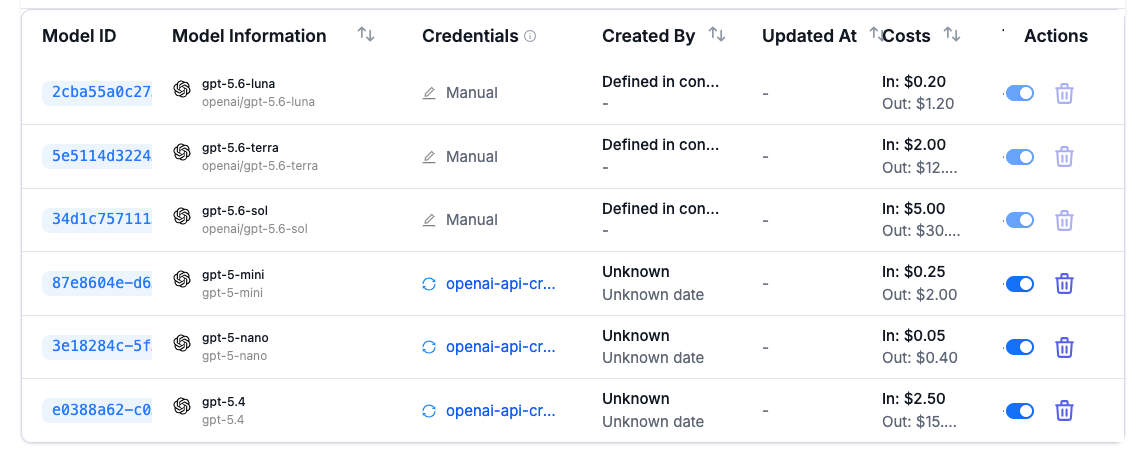
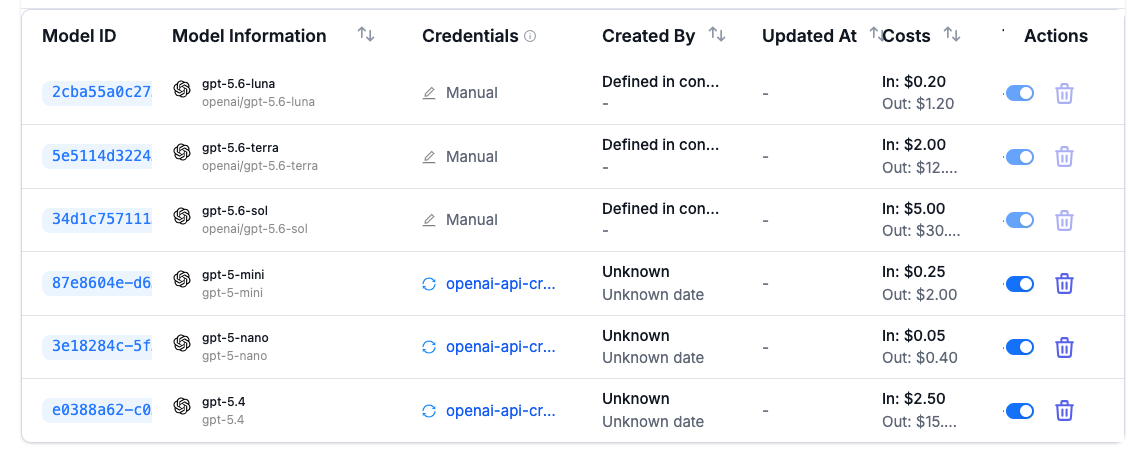
The origin of models is shown in the GUI. Models from a configuration file display a closed-lock symbol. They are effectively immutable: the GUI does not allow edits, and API calls return an error code indicating that no changes are accepted.
Model Health Checks
External providers offer LLMs through their managed infrastructure. Even the original providers, OpenAI and Anthropic, can sometimes experience service degradations or outright downtime.
With LiteLLM, health checks for specific models can be configured. Applications and tools connected to LiteLLM will only be served healthy endpoints. For handling unavailable models, model aliases can be configured, but they must be explicitly requested by the application, or a fallback policy can be defined and applied.
To apply health checks and view their results graphically, open the Models + Endpoints section through the dashboard, then select Health Status from the horizontal menu.
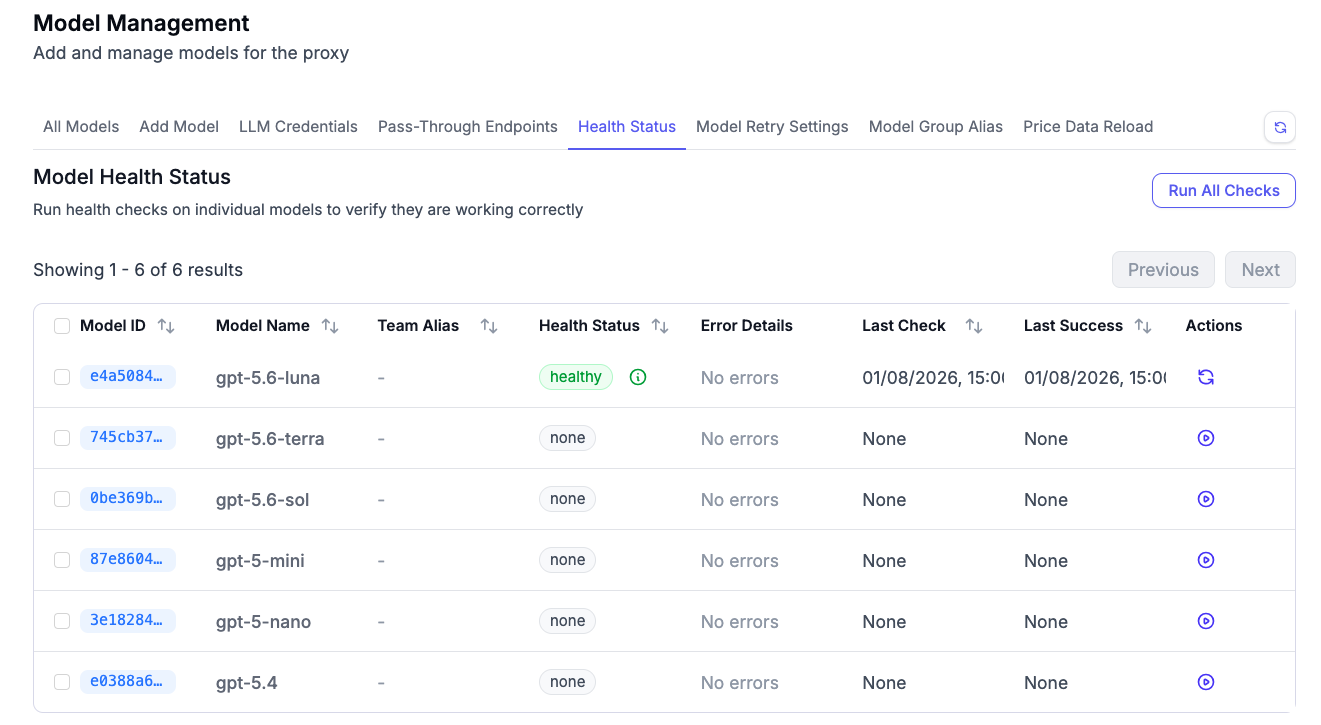
The alternative API call is as follows:
curl "http://0.0.0.0:4000/health?model=gpt-5.6-luna" \
    --header "Authorization: Bearer $LITELLM_MASTER_KEY"
{
  "healthy_endpoints": [
    {
      "custom_llm_provider": "openai",
      "use_in_pass_through": false,
      "use_litellm_proxy": false,
      "use_xai_oauth": false,
      "merge_reasoning_content_in_choices": false,
      "model": "gpt-5.6-luna",
      "max_tokens": 16,
      "cache": {
        "no-cache": true
      },
      "x-ratelimit-remaining-requests": "499",
      "x-ratelimit-remaining-tokens": "199994",
      "model_id": "e4a50849-1dae-47fd-8759-a71f175b11dd"
    }
  ],
  "unhealthy_endpoints": [],
  "healthy_count": 1,
  "unhealthy_count": 0
}
Health checks are applied whenever a model is requested. As a large model catalog could create a substantial number of health checks, this behavior can be turned off so that only explicit checks through the API endpoint trigger a status update. The following snippet needs to be placed in the configuration file:
general_settings:
  background_health_checks: false
Key Management
With a catalog of defined and configured models, LiteLLM virtual keys govern and control access to its proxy API routes and, therefore, to external connections.
API Structure and Properties
For managing keys, the following API routes are essential:
- Create
POST /key/generatePOST /key/service-account/generate
- Read
GET /key/infoGET /key/listGET /key/aliases
- Update
POST /key/updatePOST /key/bulk_updatePOST /team/key/bulk_update
- Lifecycle
POST /key/regeneratePOST /key/{key}/regeneratePOST /key/{key}/reset_spendPOST /key/blockPOST /key/unblockPOST /key/health
- Delete
POST /key/delete
Keys are fundamental. The complete set of API parameters for keys encompasses more than 50 fields, divided into the following aspects:
It is important to bear in mind that key ownership defined through roles in LiteLLM grants permissions only for CRUD operations on the key itself. The encoded key’s access to models, routes, and budgets remains unchanged, so any person or system with the key credential can use it to access the proxy’s API routes.
- Identity: Keys are alphanumeric character sequences. Their creation results in a random value with a defined pattern, but a value can also be explicitly set (
key,key_alias) - Ownership: Keys can belong to users, teams, or organizations, or they can be defined as service accounts (
user_id,team_id,organization_id) - Model management: The available models for a specific key default interestingly to all models, but they can be restricted by defining model names or key aliases; in the case of group ownership, these restrictions are also inherited (
models,aliases) - Access management: Provides total or restricted access to LiteLLM API routes (
llm_api,management,read_only), or can construct sets of explicitly named paths (allowed_routes) - Usage restrictions: Limits key applicability through required request parameters (
enforced_params,prompts), or can temporarily disable a key altogether (block) - Budget management: Defines absolute or rolling periods of available budgets when using associated models (
max_budget,budget_duration,budget_fallbacks) - Rate limits: Defines throughput barriers that consistent usage cannot violate (
rpm_limit,tpm_limit,max_parallel_requests) - Guardrails: Safeguards input, output, and tool-call content (
guardrails,policies) - Information and status: Sets additional identifiable information for keys (
metadata,tags), or controls whether key creation leads to notifications (send_invite_email) - Lifecycle: Defines automatic key rotation (
auto_rotate,rotation_interval)
Key Generation Example
Keys can be added through the GUI and the API. Management through the API should be preferred: not only is the full set of options available, but the specificity of inputs can also be persisted in version control systems, allowing for controlled and audited changes.
Key creation through the GUI was covered in my previous article getting started with LiteLLM.
Through the API, new keys are created through the /key/generate and /key/service-account routes. Here is an introductory call that includes all the attributes covered so far:
> curl -X POST "http://0.0.0.0:4000/key/generate" \
    --header "Authorization: Bearer $LITELLM_MASTER_KEY" \
    --header "Content-Type: application/json" \
    --data-raw '{
      "key_alias": "sys-ops-default-key",
      "team_id": "sys-ops",
      "models": ["gpt-5.6-luna"],
      "aliases": {"mistral": "local-llms"}
    }'
{
  "key_alias": "sys-ops-default-key",
  "duration": null,
  "models": [
    "gpt-5.6-luna"
  ],
  "spend": 0.0,
  "max_budget": null,
  # ...
  "team_id": "sys-ops",
  # ...
  "aliases": {
    "mistral": "local-llms"
  },
  # ...
  "key_name": "sk-...hJCg",
  "key_type": "default",
  "expires": null,
  # ...
  "token_id": "c9996271b8f97687bdc78c91d1ab6e91b95317aad5b922b49943fd0fbec49d17",
  "organization_id": null,
  "project_id": null,
  "litellm_budget_table": null,
  "token": "c9996271b8f97687bdc78c91d1ab6e91b95317aad5b922b49943fd0fbec49d17",
  "created_by": "default_user_id",
  "updated_by": "default_user_id",
  "created_at": "2026-08-04T17:46:52.040000Z",
  "updated_at": "2026-08-04T17:46:52.040000Z"
}
Conclusion
An LLM proxy is essential for transparently managing a large group of models for a substantial user base. It helps connect different providers, translate and transform requests from applications to provider APIs, keep costs within monetary and token budgets, and provide observability into LLM usage. This article showed two essential concepts of the LiteLLM proxy: model and API key management. For each, a concise summary of lifecycle-based API routes, request parameter groups, and concrete invocation examples was provided.