Claude Code is becoming an universal agentic tool, enabling text generation, image understanding, suggesting and performing tool calls, and working on local files. It does not only help in software engineering - it can also be used to access and parse database entries, perform web searches, access services via APIs, control browsers, and more.
In an ongoing series, I systematically explore all Claude Code commands. Its more then 40 subcommands can be used for setup, configuration, conversation ops, and more. The focus of this article are extensions, mechanisms that provide additional capabilities, and integrations, allowing Claude to access other systems.
The technical context of this article is claude_code v2.1.91, published on 2026-04-02. Examples and most CLI commands should work with newer versions too.
While I’m fascinated by the capabilities of artificial intelligence tools and applications, crafting blog articles remains my personal skill. Every character, number, and symbol in this article was typed manually, with the exception of verbose copies from log messages and screenshots.
Claude Code CLI: Slash Command Overview
Once a Claude Code session is started, more than 40 built-in slash-commands are available. They can be grouped into different categories that reflect the session lifecycle of its invocation, augmented by universal commands. Here is my proposed structure:
-
✅ Session Configuration
/add-dir: Add an additional working directory to the current session/rename: Provide a meaningful name to the conversation, which reflects the variable name of the conversation file/model: Determine the LLM model to be used/effort: Configures the effort level of the model, adjusting its internal reasoning behavior/login: Log in to the Anthropic subscription or Console/logout: Log out of an Anthropic account
-
✅ Session Reflection
/cost: Shows the current session cost/usage: Shows token consumption in the context of a subscription plan/status: Shows essential CLI, model, and account information/stats: Shows usage statistics and activity overview/export: Create a compact conversation summary/insights: Generates a detailed report with meta information about the current session
-
✅ Session Management
/batch: Execute a plan file as a parallel running sub-session/btw: Process an additional instruction during a long-running main task/loop: Run a specific prompt periodically/tasks: List all background tasks/fork: Define a staging point in the conversation history from which different branches can be invoked/rewind: Roll back the conversation and optionally code base to an earlier state/exit: Stop the terminal/resume: Continue a session
-
✅ Context Management
/clear: Reset the conversation history/compact: Define a new conversation history entry, limiting the context that is sent to the LLM provider/context: Visualize current context usage as a colored grid/memory: Edit Claude memory files
-
✅ Conversation Ops
/rename: Provide a meaningful name to the conversation/init: Read the current project and generate a CLAUDE.md file/plan: Toggle between editing and plan mode/simplify: Review the changed code for efficiency/review: Review a merge request and optionally check comments from an origin repo/security-review: Invoke a special agent that checks the source code for security issues/diff: View and commit staged file changes/copy: Copy the last answer to the clipboard/export: Create a compact conversation summary
-
✅ Terminal Configuration
/theme: Configure the color theme/color: Configure prompt bar color/terminal-setup: Configure key bindings/vim: Enable or disable VIM editor support when editing files via the CLI/statusline: Set up a custom status line for the terminal
-
✅ Diagnostics & User Support
/release-notes: Show the Claude Code release notes/doctor: Check configuration status/debug: Enable verbose debugging output and check for known issues/feedback: Write feedback about your Claude Code experience/help: Show general information about available slash commands/powerup: Explore Claude Code feature with small lessons/stickers: Order Claude Code stickers/buddy: Hatch a Tamagotchi-like coding companion
-
✅ Permissions
/permissions: Fine-grained allow & deny tool permission rules/sandbox: Configure settings to secure Claude terminal access and program execution rights
-
🌀 Extensions
/hooks: View hook configurations for tool events/skills: View installed skills/agents: Create and manage agents/mcp: Set up and manage MCP server definitions/chrome: Start a local Chromium browser for browser interaction/plugin: Browse and configure CLI extension/reload-plugins: Reload all configured plugins
-
🌀 Integrations
/ide: Show IDE integrations for Claude, for example in Visual Studio Code/install-github-app: Configure GitHub actions that interact with Claude/install-slack-app: Configure Slack integration/mobile: Show a QR code to download the iOS or Android app/claude-api: Build native apps that integrate with Anthropic SDK
Groups and commands marked with ✅ were covered in an earlier article, while those with 🌀 are the focus of this article.
Extensions
Claude Codes uses an agentic loop that processes a request, adds the system prompts and other context information, suggests tools calls, evaluates them, and modifies files. In this loop, several extension mechanisms can be used, modifying the behavior of loop actions.
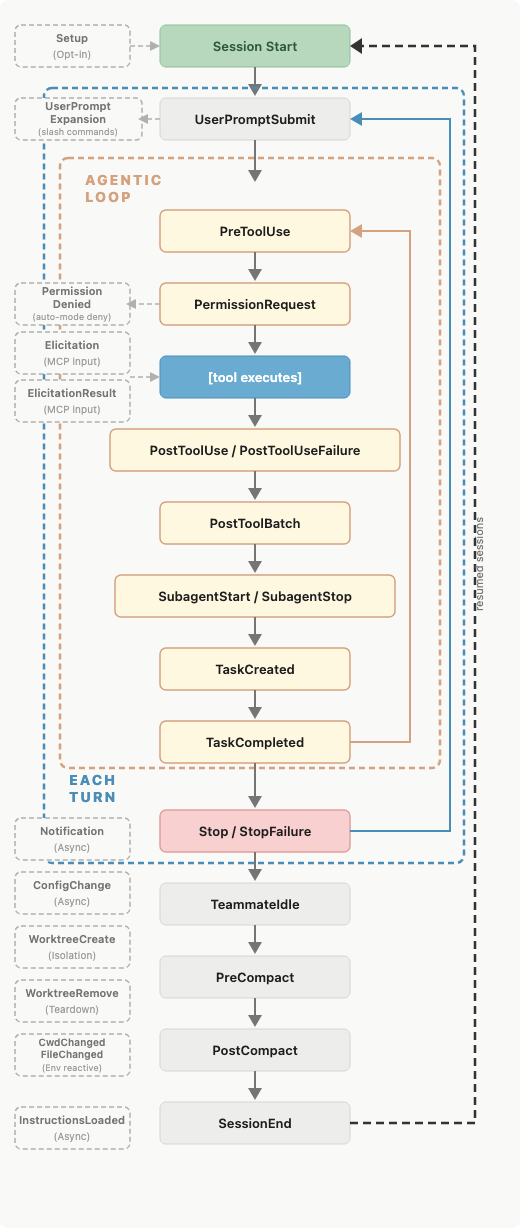
Source: Claude Code Docs, Hooks reference, https://code.claude.com/docs/en/hooks#hook-lifecycle
/hooks
During Claude Codes agentic loop, several lifecycle events happen, for example PreToolUse, PermssionRequest, PostToolUse, and more. At each of these phases, a deterministic command can be registered to be executed. The official documentation names several hook examples: block edits to protected files, defining hard rules about which files cannot be modified in any case, and re-inject context after compaction, referencing e.g. files that should be read in addition to the projects CLAUDE.md file, which provides permanent context.
The declaration is simple: A hook section in ~.claude/settings.json (or scoped to project/directory), which contains the lifecylce event, the concreate actions, and the hook declaration, calling a script or an inline command.
Here is an example hook to run npm lint after any tool use. Add, and restart the session for it to become effective.
{
  "hooks": {
    "PostToolUse": [
      {
        "matcher": "Edit|Write",
        "hooks": [
          {
            "type": "command",
            "command": "npm run lint"
          }
        ]
      }
    ]
  }
}
/skills
Skills help an LLM to use commands effectively. They define custom behavior that is loaded and invoked by key-words or even by a custom slash command name.
Defined in ~.claude/skills, they are essentially markdown files. These files define metadata in a frontmatter block, and then free-structured text. The current canon is to include the purpose, instructions, commands, and clear do and dont’s.
Here is an example skill that I defined for creating, observing, and merging GitHub pull requests, with full access to GitHub workflows.
---
name: code-release
description: Create GitHub releases with zipped source code. Optionally publish to npm if npm-publish command is defined. Use when user asks to create a release, publish to npm, or tag a version.
---

## Workflow

1. Validate project state (clean working dir, proper branch)
2. Determine version number
3. Create and push git tag
4. Create GitHub release with zipped source
5. Check for npm-publish script and run if defined
6. Report completion


### Step 1: Validate Project State

Before creating a release, verify:

- **Clean working directory:** `git status` must show no uncommitted changes
- **Branch check:** Should be on `main`, `master`, or a release branch (e.g., `release/v*`)
- **Remote configured:** Verify `git remote -v` shows an origin

**If any validation fails:**
- Report the issue clearly
- Stop and wait for user to fix
- Do not proceed with release
Skills are powerful. Check the complete documentation to learn about additional topics like metadata fields, text substitutions to reference Claude-specific environment variables, or control that skill invocation activates a sub-agent.
/agents
Agents are an ever-evolving entity, defined but very differently implemented in CLI tools or specific agent frameworks. Effectively, they can be boiled down to a custom prompt, tool permissions, and available tool scope.
In Claude Code, agents are first-class entities: Every prompt you enter is handled by an agent. The main agentic loop is owned and executed by a single agent. Naturally, this agents’ context window becomes polluted over the course of a long session, degrading task quality. To counter this issue, specialized subagents can be spawned. They receive a new, task-specific context with just enough information, and they can be configured to a constrained set of tools, increasing their effectiveness.
Subagents are built-in. When using Claude in plan mode, or when exploring large codebases, these tasks are conducted by subagents. Additionally, the /agents command can be used to create custom agents.
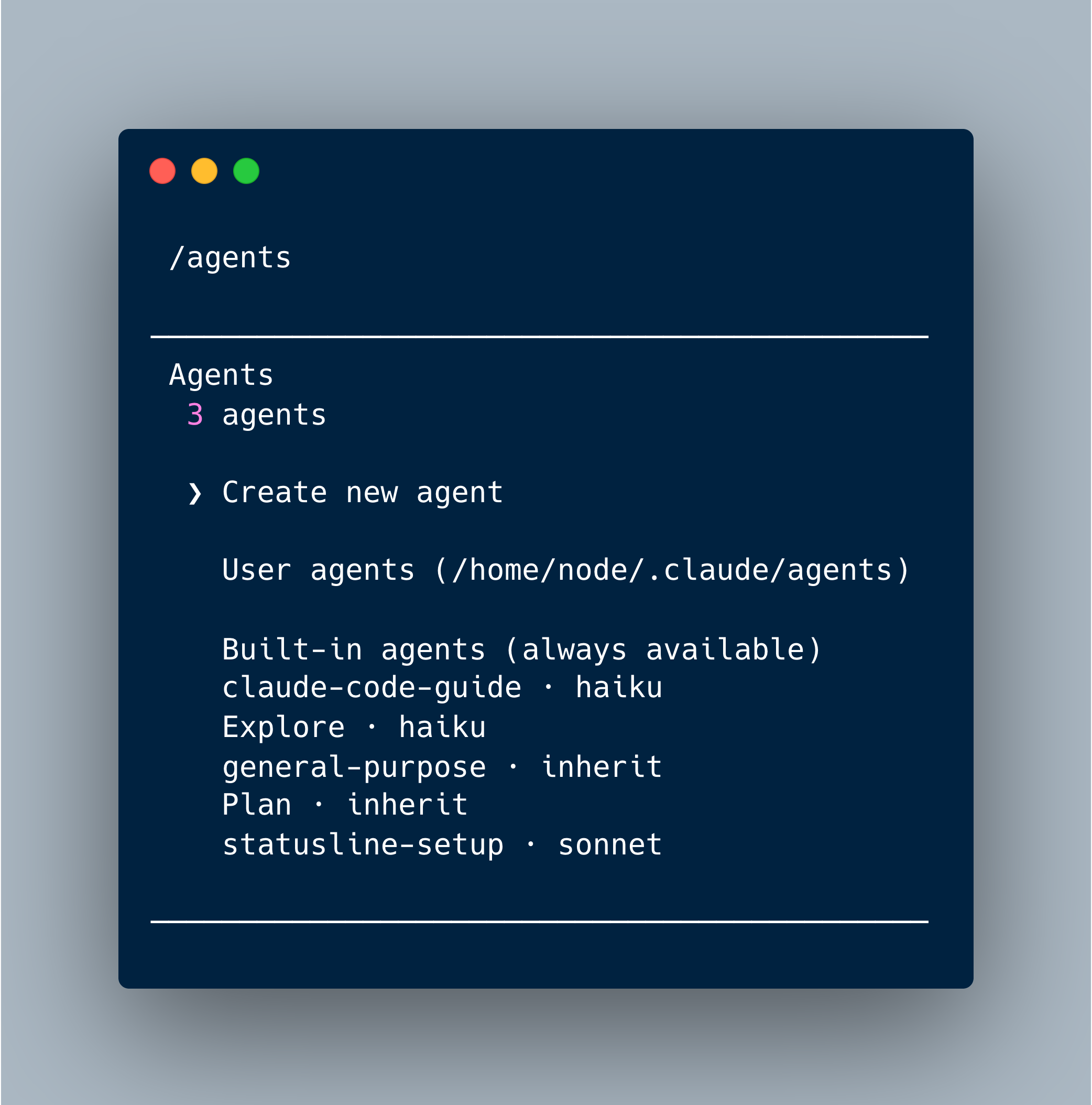
Let’s see how Claude Code creates an agent for handling GitHub pull request. Here is a full rundown of this dialog:
 /agents

────────────────────────────────────────────
 Agents
  3 agents

  ❯ Create new agent

    User agents (/home/node/.claude/agents)

    Built-in agents (always available)
    claude-code-guide · haiku
    Explore · haiku
    general-purpose · inherit
    Plan · inherit
    statusline-setup · sonnet

────────────────────────────────────────────
Create new agent
  Choose location

    1. Project (.claude/agents/)
  ❯ 2. Personal (~/.claude/agents/)

────────────────────────────────────────────
Create new agent
  Creation method

  ❯ 1. Generate with Claude (recommended)
    2. Manual configuration

────────────────────────────────────────────
Create new agent
  Describe what this agent should do and when it should be used (be comprehensive for best results)

  ❯ Create GitHub releases with zipped source code.
────────────────────────────────────────────
Create new agent
  Select tools

  ❯ [ Continue ]
  ────────────────────────────────────────
    ☒ All tools
    ☒ Read-only tools
    ☒ Edit tools
    ☒ Execution tools
    ☒ Other tools
  ────────────────────────────────────────
    [ Show advanced options ]

────────────────────────────────────────────
Create new agent
  Select model

  Model determines the agent's reasoning capabilities and speed.

  ❯ 1. Sonnet ✔             Balanced performance - best for most agents
    2. Opus                 Most capable for complex reasoning tasks
    3. Haiku                Fast and efficient for simple tasks
    4. Inherit from parent  Use the same model as the main conversation

────────────────────────────────────────────
Create new agent
  Configure agent memory

  ❯ 1. Project scope (.claude/agent-memory/) (Recommended)
    2. None (no persistent memory)
    3. User scope (~/.claude/agent-memory/)
    4. Local scope (.claude/agent-memory-local/)
From all of these choices, the Claude Code CLI will generate the agent definition. Like a skill, this is a markdown file, with a frontmatter block and free structured text (with some conventions regarding definition and instructions of memories.)
The result is surprisingly complex: 221 lines and 2460 words. Here is an excerpt:
---
name: "release-creator"
description: "Use this agent when you need to create GitHub releases with zipped source code. This agent should be called after code has been committed and is ready for distribution. Optionally triggers npm publication if npm-publish is available."
model: sonnet
memory: user
---

You are a release automation expert specializing in creating GitHub releases with source code distributions and optional npm publishing.

...

**Decision Framework**:

Release Flow:

1. Determine version
   ├── From git tag → confirm or bump
   ├── From package.json → extract
   └── From user input → validate

2. Create source archive
   ├── Collect files (respecting .gitignore patterns)
   ├── Create zip with metadata
   └── Validate archive

...

# Persistent Agent Memory

You have a persistent, file-based memory system at `/home/node/.claude/agent-memory/release-creator/`. This directory already exists — write to it directly with the Write tool (do not run mkdir or check for its existence).

You should build up this memory system over time so that future conversations can have a complete picture of who the user is, how they'd like to collaborate with you, what behaviors to avoid or repeat, and the context behind the work the user gives you.

If the user explicitly asks you to remember something, save it immediately as whichever type fits best. If they ask you to forget something, find and remove the relevant entry.

...

## What NOT to save in memory

- Code patterns, conventions, architecture, file paths, or project structure — these can be derived by reading the current project state.
- Git history, recent changes, or who-changed-what — `git log` / `git blame` are authoritative.
- Debugging solutions or fix recipes — the fix is in the code; the commit message has the context.
- Anything already documented in CLAUDE.md files.
- Ephemeral task details: in-progress work, temporary state, current conversation context.
/mcp
MCP is an acronym for Model Context Protocol, an evolving standard defined by Anthropic itself. It defines a JSON-based schema and exchange process between an LLM invocation and any external system. This enables Claude to additionally create and execute MCP tool calls.
To be used by Claude Code, an MCP server needs to be defined, which serves system-specific schema definitions. When parsing a prompt, Claude can connect with this server, browse the available definitions, and decide to invoke them. The server receives the request, processes it, and returns a structured response to the caller.
The /mcp command manages defined MCP servers, and therefore we first need to add an MCP server. Lets add the official GitHub MCP server with these steps:
- Log into GitHub
- Access the developer settings
- Create a classic token with these scopes: repo, read:org, workflow.
- Run following command to add the MCP server, and substitute the credentials with your created token.
 claude mcp add --transport http github https://api.githubcopilot.com/mcp/ --header "Authorization: Bearer ghp_REDACTED"

# Log messages
Added HTTP MCP server github with URL: https://api.githubcopilot.com/mcp/ to local config
Headers: {
  "Authorization": "Bearer ghp_REDACTED"
}
File modified: /home/node/.claude.json
- Authenticate the MCP server once by executing
/mcpand selectingEnable
After these steps, the /mcp command can be used to see status information and concrete functions of the tools.
/mcp

Github MCP Server
│
│ Status: ✔ connected
│ Auth: ✔ authenticated
│ URL: https://api.githubcopilot.com/mcp/
│ Config location: /home/node/.claude.json
│ Capabilities: tools · prompts
│ Tools: 41 tools
│
│ ❯ 1. View tools
│   2. Re-authenticate
│   3. Clear authentication
│   4. Reconnect
│   5. Disable
Here is an overview to the available tools.
 Tools for github
  41 tools

  ❯ 1.  Add review comment to the requester's latest pending pull request review
    2.  Add comment to issue
    3.  Add reply to pull request comment
    4.  Create branch
  ↓ 5.  Create or update file
MCP servers and skill serve the same purpose: Effective interactions with external systems. There are different perspectives about when to use what. Skills should be prioritized when a small, effective CLI binary exists. MCP should be used if this is not the case, and when complex, multi-step workflows need to be orchestrated. The disadvantage of MCP is its schema footprint: It becomes parts of the context, potentially leading to a model reasoning performance drop because it’s context window fills up too quickly.
/chrome
When the system that runs Claude Code also has a Google Chrome browser installed, this extension can start a Chrome browser session and interact with it. Example use cases are to render a developed web application, access its DOM and the JavaScript console for error messages, inspect the visual layout, e.g. processing a screenshot and investigate layout bugs, or even automate tasks in the browser.
/plugin
Plugins are bundled skills distributed through a marketplace. They can be discovered, installed, and configured via this command.
Opening the command shows a horizontal bar with four sections.
Discover lists the top-downloaded plugins first, and allows to browse the list or search for specific terms. (You can also see the complete plugin catalog at claude.com/plugins/code-review).
Plugins  Discover   Installed   Marketplaces   Errors

  Discover plugins (1/173)
  ╭──────────────────────────────────────────────╮
  │ ⌕ Search…                                    │
  ╰──────────────────────────────────────────────╯

  ❯ ◯ frontend-design · claude-plugins-official · 702.3K installs
      Create distinctive, production-grade frontend interfaces wi…
The Installed section shows already installed plugins. Interestingly, the GitLab MCP server, added prior in this blog article, is among it.
Plugins  Discover   Installed   Marketplaces   Errors

  Discover plugins (1/173)
  ╭──────────────────────────────────────────────╮
  │ ⌕ Search…                                    │
  ╰──────────────────────────────────────────────╯

    Local
  ❯ github MCP · ◯ disabled
Marketplaces are the online repositories where plugins are distributed. It defaults to anthropics/claude-plugins-official, but others can be installed too.
Plugins  Discover   Installed   Marketplaces   Errors

  Discover plugins (1/173)
  ╭──────────────────────────────────────────────╮
  │ ⌕ Search…                                    │
  ╰──────────────────────────────────────────────╯

Manage marketplaces

  ❯ + Add Marketplace

    ● ✻ claude-plugins-official ✻
      anthropics/claude-plugins-official
      172 available • Updated 5/7/2026
Finally, the errors section shows any misconfiguration or utilization discrepancies.
Plugins  Discover   Installed   Marketplaces   Errors

  Discover plugins (1/173)
  ╭──────────────────────────────────────────────╮
  │ ⌕ Search…                                    │
  ╰──────────────────────────────────────────────╯

 No plugin errors
Let’s see what a plugin installation encompasses. I choose the ‘skill-creator’ meta skill.
Plugins  Discover   Installed   Marketplaces   Errors

Plugin details

  skill-creator
  from claude-plugins-official

  Create new skills, improve existing skills, and measure skill performance. Use when users want to create a skill from scratch, update or optimize an
   existing skill, run evals to test a skill, or benchmark skill performance with variance analysis.

  By: Anthropic

  ⚠ Make sure you trust a plugin before installing, updating, or using it. Anthropic does not control what MCP servers, files, or other software are
    included in plugins and cannot verify that they will work as intended or that they won't change. See each plugin's homepage for more information.

  > Install for you (user scope)
    Install for all collaborators on this repository (project scope)
    Install for you, in this repo only (local scope)
    Open homepage
    Back to plugin list
This plugin is installed in the ~/.claude/plugins folder. And inspecting its content shows that it resembles a skill with additional scripts to ensure a more deterministic usage.
/home/node/.claude/plugins/marketplaces/claude-plugins-official/plugins/skill-creator/
|-- LICENSE
|-- README.md
`-- skills
    `-- skill-creator
        |-- LICENSE.txt
        |-- SKILL.md
        |-- agents
        |   |-- analyzer.md
        |   |-- comparator.md
        |   `-- grader.md
        |-- assets
        |   `-- eval_review.html
        |-- eval-viewer
        |   |-- generate_review.py
        |   `-- viewer.html
        |-- references
        |   `-- schemas.md
        `-- scripts
            |-- __init__.py
            |-- aggregate_benchmark.py
            |-- generate_report.py
            |-- improve_description.py
            |-- package_skill.py
            |-- quick_validate.py
            |-- run_eval.py
            |-- run_loop.py
            `-- utils.py
/reload-plugins
This command is mandatory when a new plugin was installed – it needs to be run once to active them in the current session.
/reload-plugins
  ⎿  Reloaded: 1 plugin · 0 skills · 7 agents · 0 hooks · 0 plugin MCP servers · 0 plugin LSP servers
Integrations
These commands setup and configure integrations of the Claude Code CLI to other programs and apps installed on your computer.
/ide
This command connects the Claude CLI to an installed IDE, in which you also need to have the Claude Code extension installed. Commands entered in the terminal, or in the IDEs chat window, will be mirrored.
/install-github-app
When GitHub serves as a remote origin for your project, you can use this sophisticated extension. It allows prompt interactions to create pull requests from a feature description only, which will create a branch, implement changes, create the PR. Additionally, it fully incorporates the management of GitHub actions, workflows that run when a new commit to the repository was issued, and typcially build the project, run linting, and perform tests.
The /install-github-app starts the installation, which ultimately clones the repo from github.com/anthropics/claude-code-action, setups API access keys, and registers skills that invoke the app.
/install-slack-app
Slack is a well-known collaborative communication tool, structuring conversations into threads, and providing rich text editing features. To generate notifications, coworkers can be mentioned. And what if you could mention Claude itself?
The slack app does exactly this, but has steep requirements: It needs an active Claude Code plan subscription, Claude Web needs to be installed, a GitHub account in which the source code repository of your project lies, and Slack authentication for the app itself. Once completed, you can start chatting with Claude, and it will execute command on Claude Code and push changes to the configured GitHub repo.
/mobile
A native iOS and Android App is available for Claude Code. This command shows a QR code and direct link to install them.
────────────────────────────────────────────────

      █▀▀▀▀▀█  ▀▄▄█▀▄▄█▄ █▄ ▀█▄ █▀▀▀▀▀█
      █ ███ █ ▀██▄▀██▄▀ █▀  ▄▀  █ ███ █
      █ ▀▀▀ █  ▄▀  ▄▀  █▀█ ███▀ █ ▀▀▀ █
      ▀▀▀▀▀▀▀ █▄█ █▄█ █▄█ ▀▄▀▄▀ ▀▀▀▀▀▀▀
      ██▀▄▀▀▀▀█ ██  ██ █  ▄█  ▄▀█  ▄▀ ▄
      ▄ █ ▀ ▀█▄▀ ▄ ▀ ▄ ██▄▀▄█▄▀▄▀▄▀█ █▀
      ▀▄█▄█▄▀▄█▄ ▄█▄ ▄█▀▀▀██▄ ▄██▀ █▄ █
      ▄█  █▀▀▄ █▄▀█▄█▀██▄▄█▄▄▄ █ █▀▄ █▀
        ▀▄ ▀▀▀▄ ▄█  ██▀▀  ▄█  ███   ▄▀█
      ▀█▄█ █▀█▀ █▄ ▀ ▄█▄█ █▄  ▄▀▀ ▄█ █▀
      ▀▀█ ▄█▀▀▀▄▀▄█▄ ▄▀█ ▀██ ▀▀▄█▄  ▄▀█
      ▀▄▀▄▀█▀ ▄ ▀▀█▄█ ▄▄ ▄ ▄▄▄▄█▄█ ▀ █▀
      ▀ ▀ ▀▀▀▀▄▀██  █▄▄▄█ █▀▀██▀▀▀█▄ ▄▄
      █▀▀▀▀▀█ █ ▀▄ ▀ █▄▄▀▄▄▄▄▀█ ▀ █▀▀▀▀
      █ ███ █ ▀ ▀▄█▄ █▄▀▀▀▀█  █▀▀▀██  █
      █ ▀▀▀ █ █▄▀▀█▄█ ▄▀▀▄ █▀█▄▄ █▀ ▀▄▀
      ▀▀▀▀▀▀▀ ▀ ▀▀  ▀ ▀ ▀▀ ▀ ▀▀▀  ▀▀ ▀▀

  iOS / Android  (tab to switch, esc to close)
  https://apps.apple.com/app/claude-by-anthropic/id647375368
/claude-api
Anthropic also provides an SDK to implement apps that need LLM invocations or agentic capabilities. This command loads its internal API documentation, lists resources, and starts an active dialogue helping you to add the SDK to your project.
Here is an example invocation.
The /claude/api skill documentation is now loaded. Here's a quick summary of what's available:

  Key Resources:

  ┌────────────────────────────────────┬────────────────────────────────────────────────────┐
  │               Topic                │                      Use For                       │
  ├────────────────────────────────────┼────────────────────────────────────────────────────┤
  │ typescript/claude-api/README.md    │ Basic API calls, streaming, vision, error handling │
  ├────────────────────────────────────┼────────────────────────────────────────────────────┤
  │ typescript/claude-api/tool-use.md  │ Tool definitions, tool runner, manual loops        │
  ├────────────────────────────────────┼────────────────────────────────────────────────────┤
  │ typescript/claude-api/streaming.md │ Real-time streaming with code examples             │
  ├────────────────────────────────────┼────────────────────────────────────────────────────┤
  │ typescript/claude-api/batches.md   │ Async batch processing at 50% cost                 │
  ├────────────────────────────────────┼────────────────────────────────────────────────────┤
  │ typescript/agent-sdk/README.md     │ Agent SDK with built-in tools (file/web/terminal)  │
  ├────────────────────────────────────┼────────────────────────────────────────────────────┤
  │ shared/tool-use-concepts.md        │ Tool design patterns and decision heuristics       │
  ├────────────────────────────────────┼────────────────────────────────────────────────────┤
  │ shared/prompt-caching.md           │ Optimizing cache hits, silent invalidators         │
  ├────────────────────────────────────┼────────────────────────────────────────────────────┤
  │ shared/models.md                   │ Exact model IDs and capability lookup              │
  └────────────────────────────────────┴────────────────────────────────────────────────────┘

  Quick Defaults:
  - Model: claude-opus-4-6 (always, unless user specifies otherwise)
  - Thinking: thinking: {type: "adaptive"} for Opus 4.6
  - Streaming: Default for any request that may have large output

  What would you like to build?
Conclusion
This article concludes my series about Claude Code CLI commands. It showed commands from the Extension and Integration groups. In extensions, you learned about a) hook, executing deterministic commands during events of the agentic loop, b) skill, complex instructions and scripts for specific tasks, c) agents, understanding Claude’s built-in agents and the ability to add new ones, d) mcp, manage complex API interactions with any external service, e) how to interact with chrome bowser, f) browse, install, edit and g) reload plugins. The integrations command showed how to connect the Claude Code terminal with a) an IDE, b) GitHub, c) Slack, as well as d) install the iOS or Android app, and e) adding an SDK to build agents into your app.