In Hashicorp Vault, secrets engines provide a uniform way to store and manage credentials, encryption keys, certificates and other sensitive information. To gain access to a secret, a typically time restricted token is generated. With this token, the secret can be read by any client application.
Secrets themselves can be static or dynamic. A static secret is stored as-is, and has a typical lifetime of several weeks or even months. Dynamic secrets are created on-demand with a limited lifetime of several hours or days, and are revoked at the end of their lifetime.
The transit secrets engine manages dynamic secrets to facilitate exchange between several applications. It stores generated or externally keys imported into Vault, and uses these keys to encrypt/decrypt data. This discusses the principal usage, covers all API endpoints, and shows a practical example.
The technical context of this article is hashicorp_vault_v1.21.1, released 2025-11-18. All provided information and command examples should be valid with newer versions too, baring an update of the CLI commands’ syntax.
The background material for this article stems from the official Hashicorp Vault documentation about Transit secrets engine and Transit secrets engine (API).
Transit Secrets Engine
In Hashicorp Vault, secrets engine can be accessed with a proper token, and provide different endpoints for their functionality. With the Transit Secrets engine, the stored secrets are key themselves, in different formats such as AES or RSA.
Based on these keys, different functions are offered. The main use-case is the encryption and decryption of plaintext data, where the data itself is not stored in Vault. Other functions are to sign and verify data, to create hash values for data as a means to validate data integrity, as well as to generate random bytes as entropy input to external encryption processes.
In essence, the transit secrets engine provides encryption-as-a-service. Applications do not need to implement encryption functions themselves, but can access a Hashicorp Vault server instance instead.
Setup
To initialize the transit secrets engine, it needs to be enabled via the CLI or the GUI. Continuing the focus in this blog series, CLI commands will be shown.
> vault secrets enable -path /transit transit

# Log messages
[INFO]  core: successful mount: namespace="" path=transit/ type=transit version="v1.21.1+builtin.vault"
No other configuration steps are necessary. The mounted transit secrets engine provides 39 different API methods for its core functionality, key management, and general operation. Following subsections explore them in detail.
Encryption Keys
The transit engine stores encryption keys with which data is decrypted and encrypted. It is possible to import keys and to generate new ones.
The key generation API method creates an RSA key with specified bit length and padding scheme. Additionally, key derivation context data and a nonce can be used. The endpoint either returns the key in plaintext or in cipher form.
POST /transit/datakey/{plaintext}/{name}
A new key can also be generated with a CSR. The endpoint generates the key and stores it internally.
POST /transit/keys/{name}/csr
It is also an option to import an external key, which can be variants of aes and rsa, as well as ed25519 and hmac.
First of all, the engines public key needs to be generated with the following endpoint.
GET /transit/wrapping_key
Second, following the instructions about bring your own key, a ciphertext needs to be created, which is an Vault-internal data format for the key. The ciphertext, key-type, and additional key-specific parameters are then passed to the following endpoints.
POST  /transit/keys/{name}/import
POST  /transit/keys/{name}/import_version
Encrypt and Decrypt Data
The data encryption endpoints require in its most essential form only the key name and the base64 encoded plaintext. When the used key is configured with key derivation, then also its context and associated data must be provided. For older versions of Vault, the nonce value could be provided - it is still an endpoint parameter, but not required. Finally, it is also possible to encrypt several plaintexts as well, requiring a structured JSON List with items that include the plaintext parameters, and others required for the targeted key.
POST /transit/encrypt/{name}
The complementing decryption endpoint requires the key name and the ciphertext. Additional parameters are the same as of the encryption endpoint.
POST /transit/decrypt/{name}
Sign and Verify Data
Encryption keys stored in the transit engine can be used to sign data. Several parameters can be provided to configure the signing process: key version, hash algorithm, signature and marshaling algorithm, and the used salt. Input data can be single, base64 encoded text, or a structured JSON format with a list of strings. The signing process returns a Vault-specific signature string.
POST  /transit/sign/{name}
POST  /transit/sign/{name}/{algorithm}
To verify data, the complementary endpoint can be used. It requires the original input (single text or structured JSON), and the signature string. Additional parameters used during signing, such as the key version and hash algorithm, can be provided too. Furthermore, this endpoint can also be used for verifying HMAC data.
POST  /transit/verify/{name}
POST  /transit/verify/{name}/{algorithm}
Creating HMAC Values
In cryptography, the message authentication code (MAC) is a unique signature for an arbitrary payload data and key. When two parties share the key, they can authenticate and check the integrity of exchanged messages.
Hashicorp Vault provides and endpoint to sign data using a hash function. The key name must be provided, optionally the hash algorithm, and mandatory the single or structured plaintext data.
POST  /transit/hmac/{name}
POST  /transit/hmac/{name}/{algorithm}
The returned HMAC data can be verified with the above explained /transit/verify endpoint.
Creating Hash Values
Hash values of data are unique identifiers that can be used to ensure data integrity. Hash values can be created for any base64 encoded input data, and returned as either base64 or hex value. Also, different sha2 and sha3 algorithms are supported.
POST  /transit/hash
POST  /transit/hash/{algorithm}
Creating Random Bytes
Random data can be used as a nonce for encrypting data. The available API endpoints return base64 or hex encoded values of defined byte length. Additionally, the entropy source from which the bytes are generated can be configured: either the virtual or physical server itself, or with the entropy augmentation feature from an enterprise vault.
POST  transit/random
POST  transit/random/{source}
POST  transit/random/{source}/{bytes}
POST  transit/random/{bytes}
Manage Encryption Keys
All configured keys can be read-accessed, returning type information and optionally the ciphertext, a Vault internal data form representing the key. For some keys, their internal configuration can be retrieved too.
GET /transit/keys/
GET /transit/keys/{name}
GET /transit/config/keys
Existing keys can be updated or deleted.
POST  /transit/keys/{name}
DELETE  /transit/keys/{name}
Some aspects of managed keys can be reconfigured without creating new keys.
POST  /transit/config/keys`
POST  /transit/keys/{name}/config
Key rotation is a security best practice, and implemented in Vault by a dedicated API method. Stored key versions are kept indefinitely, but limits can be set via key configuration, or explicitly trimmed.
POST  /transit/keys/{name}/rotate
POST  /transit/keys/{name}/trim
When keys are versioned, older ciphertexts are not valid anymore. They can be rewrapped to the newest version of a key.
POST /transit/rewrap/{name}
For stored keys, the corresponding certificate chain can be configured. Please note: The documentation does not detail if this method is only applicable to keys created with the CSR endpoint, data keys, or imported keys.
POST /transit/keys/{name}/set-certificate
When the keys need to be migrated to an external system, they can be explicitly exported. The API methods are differentiated into keys created with the transit engine itself or externally created keys. The export itself targets either the most recent version of a key, or a very specific version identified by a time string.
GET /transit/export/{type}/{name}
GET /transit/export/{type}/{name}/{version}
GET /transit/byok-export/{destination}/{source}
GET /transit/byok-export/{destination}/{source}/{version}
Backup and Restore
For any managed key, a complete plaintext backup can be generated. This contains the keys ciphertext, its HMAC, and its version information. A corresponding endpoint can be used to restore keys from their backup data.
GET transit/backup/{name}
POST  transit/restore
POST  transit/restore/{name}
Cache Management
The transit secrets engine internally caches its responses. The current number of items in the cache can be read, and the maximum allowed number of cached items can be seat (but requires a reload of the plugin to become effective).
GET transit/cache-config
POST  transit/cache-config
Transit Secrets Engine Example: Date Encryption and Decryption
In this example, a transit secrets engine with an internally managed key will be setup.
First of all, the engine itself needs to be created.
> vault secrets enable -path /transit transit

# Log messages
[INFO]  core: successful mount: namespace="" path=transit/ type=transit version="v1.20.0+builtin.vault"
Next, a key will be generated.
> vault write transit/keys/cha type=chacha20-poly1305

# Log messages
Key                       Value
---                       -----
allow_plaintext_backup    false
auto_rotate_period        0s
deletion_allowed          false
derived                   false
exportable                false
imported_key              false
keys                      map[1:1760175423]
latest_version            1
min_available_version     0
min_decryption_version    1
min_encryption_version    0
name                      cha
supports_decryption       true
supports_derivation       true
supports_encryption       true
supports_signing          false
type                      chacha20-poly1305
With the key in place, let’s explore the decryption and encryption of data.
First, the plaintext data needs to be base64 encoded:
> echo "Lorem ipsum dolor sit amet"|base64

# Log messages
TG9yZW0gaXBzdW0gZG9sb3Igc2l0IGFtZXQK
This encoded text needs to be sent to the key endpoint.
> vault write transit/encrypt/cha plaintext="TG9yZW0gaXBzdW0gZG9sb3Igc2l0IGFtZXQK"

# Log messages
Key            Value
---            -----
ciphertext     vault:v1:KihZ/vP/a/4Jk7N0533I1bj+TGWE526HrMyr1V6+RJYCPNsGv1XQxDGxQoUBRDuYE8qyNRk7bQ==
key_version    1
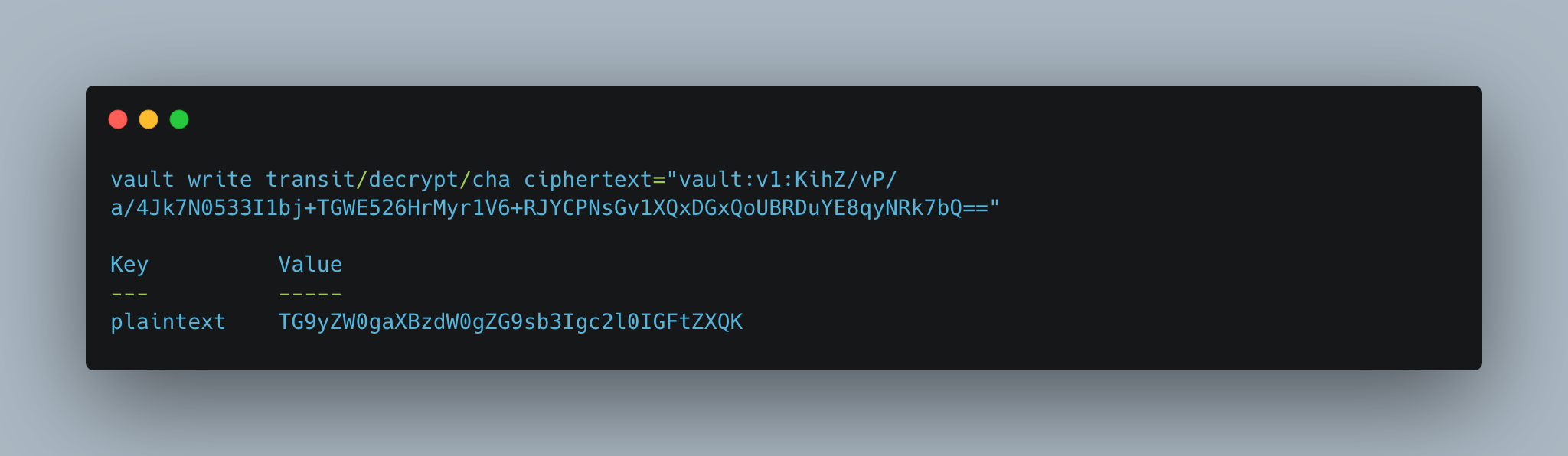
The ciphertext starts with the metainformation vault:v1:, followed by the decrypted text. Decryption is straightforward:
> vault write transit/decrypt/cha ciphertext="vault:v1:KihZ/vP/a/4Jk7N0533I1bj+TGWE526HrMyr1V6+RJYCPNsGv1XQxDGxQoUBRDuYE8qyNRk7bQ=="

# Log messages
Key          Value
---          -----
plaintext    TG9yZW0gaXBzdW0gZG9sb3Igc2l0IGFtZXQK
Vault supports key rotation, and therefore decryption requires to specify the key version too. Once a newer key is in use, old ciphertext versions need to be rewrapped.
Let’s rotate the key twice.
> vault write -force transit/keys/cha/rotate
> vault write -force transit/keys/cha/rotate

# Log messages
Key                       Value
---                       -----
allow_plaintext_backup    false
auto_rotate_period        0s
deletion_allowed          false
derived                   false
exportable                false
imported_key              false
keys                      map[1:1760175423 2:1760177345 3:1760177350]
latest_version            3
min_available_version     0
min_decryption_version    1
min_encryption_version    0
name                      cha
supports_decryption       true
supports_derivation       true
supports_encryption       true
supports_signing          false
type                      chacha20-poly1305
Then, try to decrypt the ciphertext, but alter its metainformation.
> vault write transit/decrypt/cha ciphertext="vault:v2:KihZ/vP/a/4Jk7N0533I1bj+TGWE526HrMyr1V6+RJYCPNsGv1XQxDGxQoUBRDuYE8qyNRk7bQ=="

# Log messages
Error writing data to transit/decrypt/cha: Error making API request.

URL: PUT http://127.0.0.1:8210/v1/transit/decrypt/cha
Code: 400. Errors:

* chacha20poly1305: message authentication failed
Let’s rewrap the ciphertext …
> vault write transit/rewrap/cha ciphertext="vault:v1:KihZ/vP/a/4Jk7N0533I1bj+TGWE526HrMyr1V6+RJYCPNsGv1XQxDGxQoUBRDuYE8qyNRk7bQ=="

# Log messages
Key            Value
---            -----
ciphertext     vault:v3:W1lRpdvej7N5IEWuxqOqLSiYCibD0/cu9lLNXt1fhInGxTrLkvuXUyf3I4AqdQj8VbCALvjZrA==
key_version    3
.. and then decrypt it:
> vault write transit/decrypt/cha ciphertext="vault:v3:W1lRpdvej7N5IEWuxqOqLSiYCibD0/cu9lLNXt1fhInGxTrLkvuXUyf3I4AqdQj8VbCALvjZrA=="

# Log messages
Key          Value
---          -----
plaintext    TG9yZW0gaXBzdW0gZG9sb3Igc2l0IGFtZXQK
Old versions of a key can be removed intentionally, but any non-rewrapped ciphertext is then irrevocably lost. To remove old versions, the values min_decryption_version and min_encryption_version should be set to the desired version, and a background job in the Vault instance deletes non-required versions eventually.
> vault write transit/keys/cha/config min_decryption_version=3 min_encryption_version=3

# Log messages
Key                       Value
---                       -----
allow_plaintext_backup    false
auto_rotate_period        0s
deletion_allowed          false
derived                   false
exportable                false
imported_key              false
keys                      map[3:1760177350]
latest_version            3
min_available_version     0
min_decryption_version    3
min_encryption_version    3
name                      cha
supports_decryption       true
supports_derivation       true
supports_encryption       true
supports_signing          false
type                      chacha20-poly1305
Conclusion
In Hashicorp Vault, secrets engines manage setup and access to confidential data. The transit secrets engine provides a special use case: Encryption and decryption of plaintext data without actually storing it. This blog post introduced and showed how to setup and use this engine. The first step is the generation or import of a key, supporting different variants of AES, RSA, and ED25519. Once stored, several endpoints for various use cases become available. The encryption endpoint accepts base64 encoded plaintext, and returns a ciphertext. Likewise, the decryption endpoint expects to be passed the full ciphertext, and will return the base64 decoded base text. These texts are not stored at all in Vault - client applications are expected to handle them. Additional endpoints support signing and verifying data, creating HMAC values or hash values, and random bytes. Overall, the transit secrets’ engine features complement the Vault functionality with a secrets-as-a-service component.